LearnSCADA Sim: the free, offline Modbus device simulator
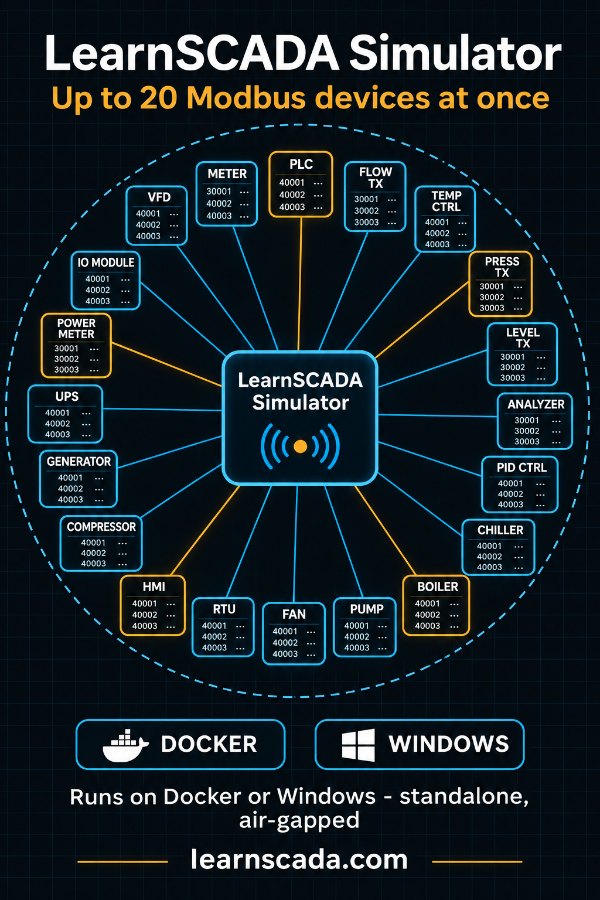
LearnSCADA Sim is a free Modbus device simulator that runs fully offline, on Windows or in Docker. It simulates up to 20 Modbus TCP devices at once, each on its own port, from nothing more than their register maps. No hardware, no internet connection and no per-device code are needed.
Test before the devices exist
You need to test HMI and SCADA screens and the control logic behind them, but the real devices aren't there. They're on order, still being built, or sitting on an isolated OT network you can't reach from the internet. Waiting for them pushes testing to the end of the project, where every problem costs the most.
Other simulators don't fit the job. Most model one device at a time, need an internet connection or a cloud account, or need code written for every device you want to fake. LearnSCADA Sim was built for the test bench: many devices at once, no connection, and nothing to write but the register map.
What it does
Runs air-gapped
Install it from one download and run it on an isolated network. No cloud, no internet, no sign-in and no phone-home. Even the license is checked offline.
Up to 20 devices at once
Each simulated device is its own Modbus TCP endpoint, on its own port, with its own register map and dashboard. Your SCADA sees separate devices, just as it would on the plant floor.
Driven by the register map
Give it a device's register map (a CSV or JSON file, or a PLCSIM workbook) and it stands the device up. No per-device code. It also makes an Ignition 8.1 UDT for every device.
Free to monitor, licensed to control
Free (read-only)
- Your HMI or SCADA reads live values from every simulated device
- Full use for screen, trend, alarm and monitoring tests
- No time limit
- Runs air-gapped, on Docker or Windows
- Up to 20 devices, each from its register map
Licensed (read-write)
- Everything in Free
- Your system writes setpoints and commands back to the devices
- Test control logic, commands and closed-loop behavior end to end
- One license file for the whole bench, any number of devices
- Pay once: it never expires
A license is $199 once. One license covers one bench: every device on it, on Docker or Windows. It never expires, and it's checked offline. You download the license file right after checkout, and it stays in your LearnSCADA account.
Where it earns its keep
- FAT and SAT: run the acceptance tests against realistic devices, with a known map, on the test bench
- Commissioning before the hardware arrives: have the screens and logic proven before the panels are delivered
- HMI screen validation: check every tag, scaling, unit and alarm against the register map
- Training and labs: give every student their own set of devices, with nothing to break
- Troubleshooting: compare a misbehaving system against a known-good device
- Air-gapped and secure networks: test inside the security boundary, with nothing reaching out
How to get it
Version 0.1.2 is an early release: it works and is tested on Docker and Windows, and it is still growing. Both packages are free and work offline once downloaded.
Linux with Docker
Download for Docker (v0.1.2) SHA-256
unzip learnscadasim-0.1.2.zip -d learnscadasim && cd learnscadasim
sha256sum -c SHA256SUMS
docker load -i learnscadasim-0.1.2.tar
docker compose up -d
# then open http://<this machine>:8080
The image ships inside the download, so the machine that runs it never needs the internet.
Windows 10 or 11 (64-bit), no Docker
Download for Windows (v0.1.2) SHA-256
1. Right-click learnscadasim-0.1.2-windows-x64.zip and choose Extract All.
2. Double-click "Start LearnSCADASim.bat". The hub opens at http://localhost:8080/
3. To let other PCs, HMIs or SCADA connect, right-click
   "Allow through Windows Firewall.bat" and choose Run as administrator.
All files, checksums and release notes are on GitHub: Release 0.1.2 · github.com/cbvance/learnscadasim-releases
Go deeper
Questions
- Is LearnSCADA Sim free?
- Yes. The full simulator is free to download and use, with no time limit. The free version is read-only: your HMI or SCADA can read every simulated device. A one-time license adds read-write.
- Does it need an internet connection?
- No. It installs from one download and runs fully air-gapped, with no cloud, no sign-in and no phone-home. The license file is checked offline too.
- How many devices can it simulate at once?
- Up to 20 on one hub by default, each its own Modbus TCP endpoint on its own port, with its own register map. A setting raises the limit.
- What protocols does it support?
- Modbus TCP: coils, discrete inputs, holding registers and input registers, on any port you choose. Serial Modbus RTU and ASCII are not supported.
- What platforms does it run on?
- Windows 10 and 11 (64-bit), natively with nothing to install, and Linux with Docker. There is no separate native Linux build.
- Do I need to write code for each device?
- No. Give it the device's register map, as a CSV or JSON file or a PLCSIM workbook, and it builds the simulated device from that alone.
- Can my HMI write to it?
- Only with a license. Without one, every Modbus write is refused with exception 01. With the license, your HMI or SCADA can write setpoints and commands to every simulated device.